
How Authenticx Works
This diagram shows how customer interaction data moves through Authenticx, from source systems, through ingestion and secure storage, into AI processing, and then into the web application and optional outbound emissions.
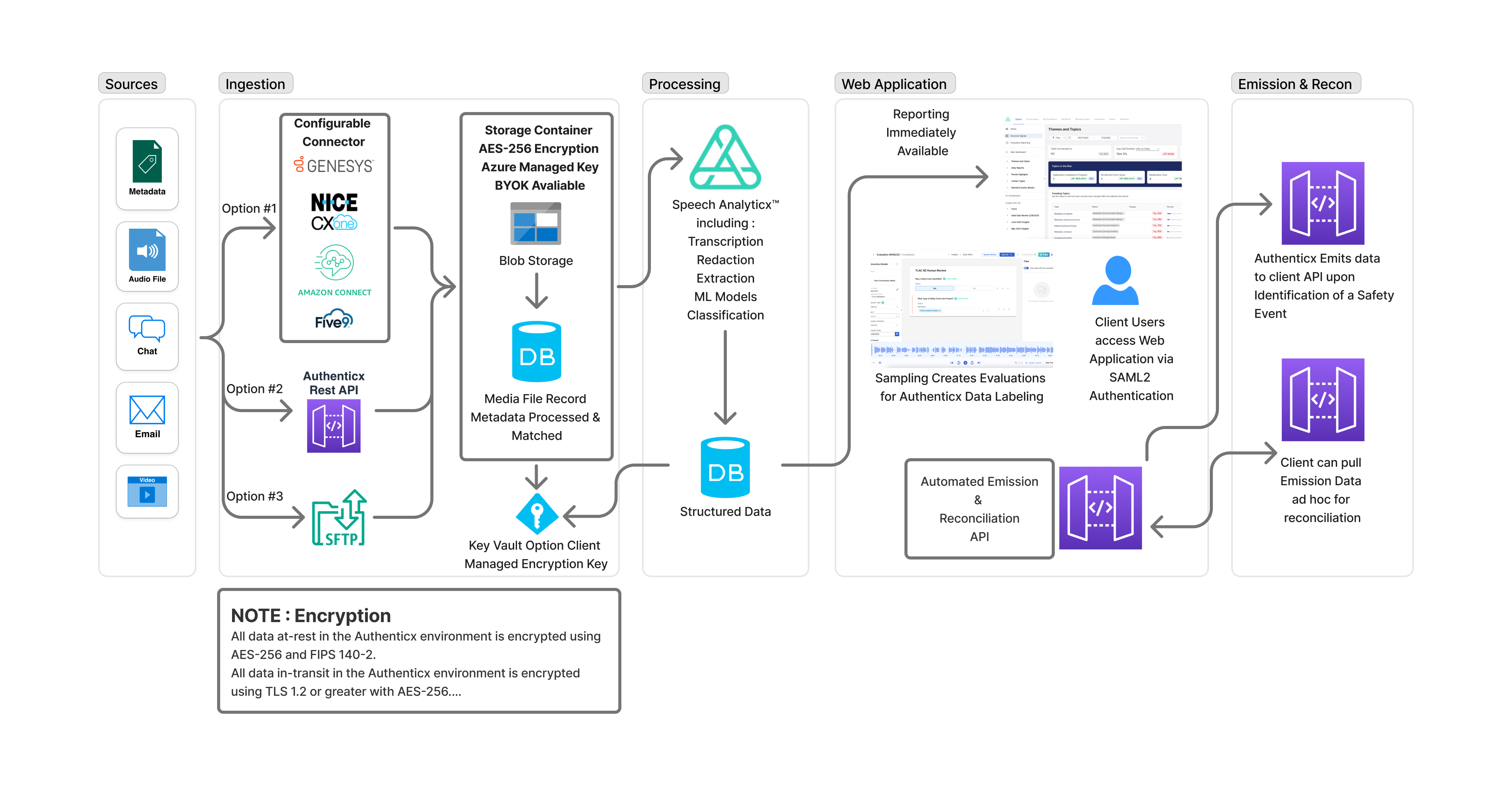
1) Sources (what you provide)
Authenticx starts with conversational artifacts and context, such as:
- Metadata (conversation details like IDs, timestamps, queue/agent attributes, etc.)
- Audio files
- Chat transcripts
- other sources like email, depending on your program
2) Ingestion (how data enters Authenticx)
Authenticx supports multiple ingestion paths—choose the one that fits your environment:
-
Option #1: Configurable Connectors
Native integrations for contact center platforms (e.g., Genesys, NICE CXone, Amazon Connect, Five9).
These connectors automate collection and delivery of interaction data into Authenticx. -
Option #2: Authenticx REST API (AcxAPI)
Your application uploads interactions directly via API endpoints (commonly used for programmatic uploads and automation workflows). -
Option #3: SFTP
Batch delivery via secure file transfer for scheduled or large-volume file drops.
3) Secure storage + Metadata Matching (what happens immediately after ingestion)
After ingestion:
- Media files land in a secure storage container
- Authenticx creates a media file record
- Metadata is processed and matched to the uploaded media so the interaction can be processed consistently end-to-end
Security note
Data is encrypted:
- At rest: AES-256 (with strong compliance alignment, e.g., FIPS 140-2 controls)
- In transit: TLS 1.2+ encryption
4) Processing (AI pipeline)
Once media + metadata are matched, Authenticx Speech Analyticx processing runs, which may include:
- Transcription (for audio)
- Redaction (to protect sensitive information where applicable)
- Extraction (structured fields from conversations)
- ML models (e.g., detection, categorization, insights)
- Classification (themes/topics, safety signals, and other analytic outputs)
Outputs are written into structured data storage for reporting, search, and downstream actions.
5) Web application (how users access results)
Processed results become available in the Authenticx web application:
- Reporting and analytics are available as soon as processing completes
- Sampling workflows can create evaluations or modules used for labeling and quality programs
- Client users access the web application via SAML2 authentication (if configured).
6) Emission (outbound integrations)
Authenticx can send or support retrieval of outbound events/data:
- Event-based emission: Authenticx can emit data to a client API when a configured signal occurs (e.g., identification of a safety event)
Updated 10 months ago