
Snowflake Integration
Authenticx integrates directly with Snowflake, letting you enrich conversations with your own warehouse data and deliver conversation intelligence straight into the tables your analytics teams already query.
How it works
Authenticx connects to your Snowflake account as each conversation is processed. This integration supports:
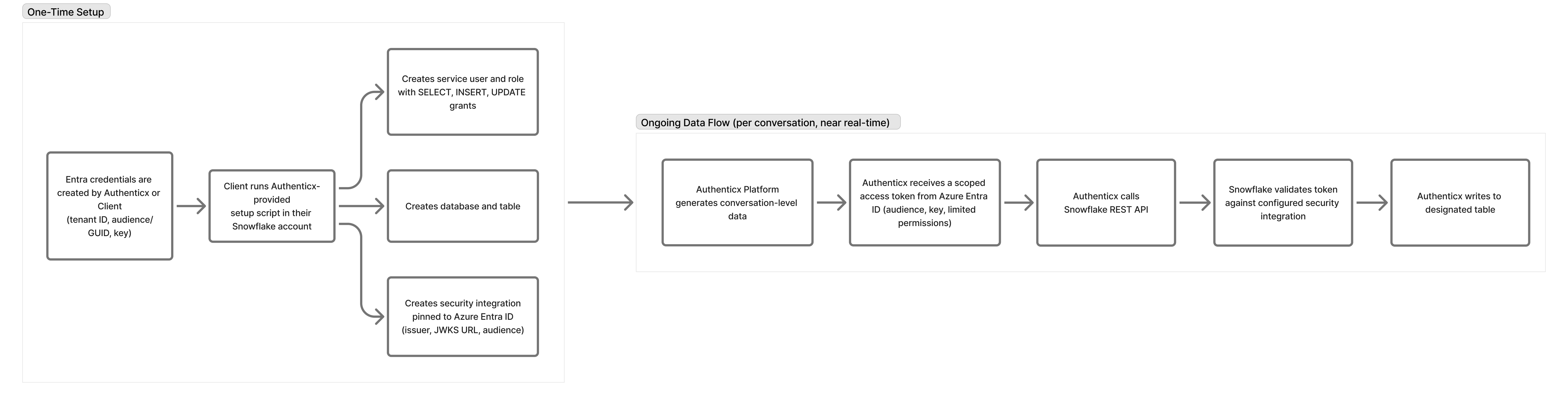
- Delivery (write) — Authenticx writes conversation intelligence — transcripts, AI model results, scorecard and evaluation scores, and any other enrichment data — into a Snowflake table you specify, with full control over which fields are exported and which columns they map to. The transfer uses a standard REST API call.
- Authentication - Access is secured using Azure Entra ID as the OAuth issuer. Authenticx requests a scoped token from Entra ID, which is issued against an agreed-upon audience and key (limiting what the token can do and where it's valid).
- We can walk your team through the setup on your end, and we're proposing that Authenticx manage the issuer configuration, since that gives us the ability to rotate keys and manage credentials without requiring changes on your side. Even with Authenticx managing the issuer, your team retains the ability to disable access at any time.
- One-time setup - Before the ongoing data flow can begin, your team will need to run a short setup script (outlined in the setup page) once in your Snowflake account. That script:
- Creates the target database and table for the incoming data (if Authenticx is defining the schema)
- Creates the Snowflake security integration, pinned to Azure Entra ID as the OAuth provider
- Creates a dedicated service user and role for Authenticx, scoped to the permissions below
- Configures data write pattern and permissions
- Once authenticated, Authenticx calls the Snowflake REST API to write records into the designated table inside your Snowflake account — never anywhere else. The service role is granted SELECT, INSERT, and UPDATE on the table (no DELETE), so Authenticx can add new conversation records, update existing ones as needed, and read data back for verification, but cannot remove data from your environment.
Configuration
Your Authenticx representative will work with you to configure:
- Authentication — Azure Entra ID credentials; credentials are stored securely in a customer-specific Key Vault and never exposed in configuration
- Connection details — user and role
- Target table — the database / schema / table Authenticx writes to
- Field mapping — which conversation fields within Authenticx map to which Snowflake columns
- Write mode — insert new rows, or merge (upsert) into existing rows using match columns you define
Requirements
- A Snowflake warehouse, database, and schema, with a role granted write access to the target table
- Azure Entra ID credentials provisioned for Authenticx (Authenticx can also provision credentials for our use)
- Table and column names limited to standard SQL identifiers (letters, numbers, and underscores)
Snowflake integrations are configured per organization. Contact your Authenticx representative to set up delivery.
Updated about 11 hours ago
Did this page help you?